
Kuaishou Video Downloader Without Watermark HD & 4K
Save any public Kuaishou or Kwai video in its original HD quality, with no logo and no login.
Download any Kuaishou or Kwai video in seconds with our free online Kuaishou video downloader — 4K Ultra HD quality, no watermark, no login required. It works instantly on every device: Android, iPhone, and PC. Save your favorite Kuaishou videos in high quality — the simple, reliable way. Whether you use the Chinese Kuaishou app or the international Kwai version, you get unlimited downloads right in your browser, with nothing to install.
Copy the Link
Open the Kuaishou or Kwai app, tap Share, then Copy Link. Done — you've got everything you need.
Paste It Here
Drop the link into the downloader box above and hit Download. No sign-up, no waiting, no nonsense.
Save in HD / 4K
Pick your quality — the clean, watermark-free video lands on your device instantly.
How It Works
Download Kuaishou & Kwai Videos:
3 Simple Steps (2026)
Our free Kuaishou video downloader needs no app and no sign-up — just three quick steps and your video is yours.
Download videos free — no watermark, no fees — with our Kuaishou video downloader. Here are the three quick steps:
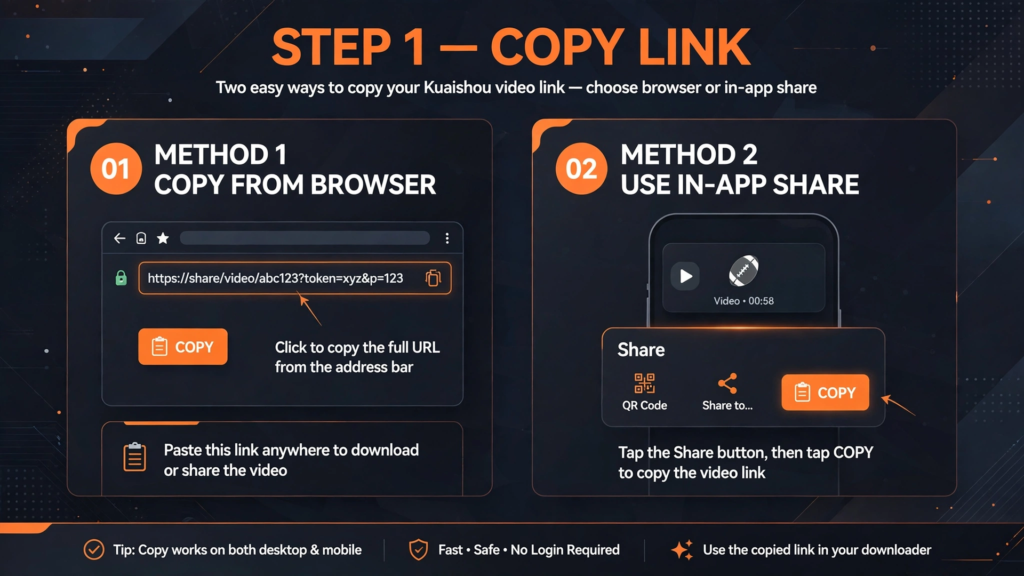
Step 1 — Grab the Link
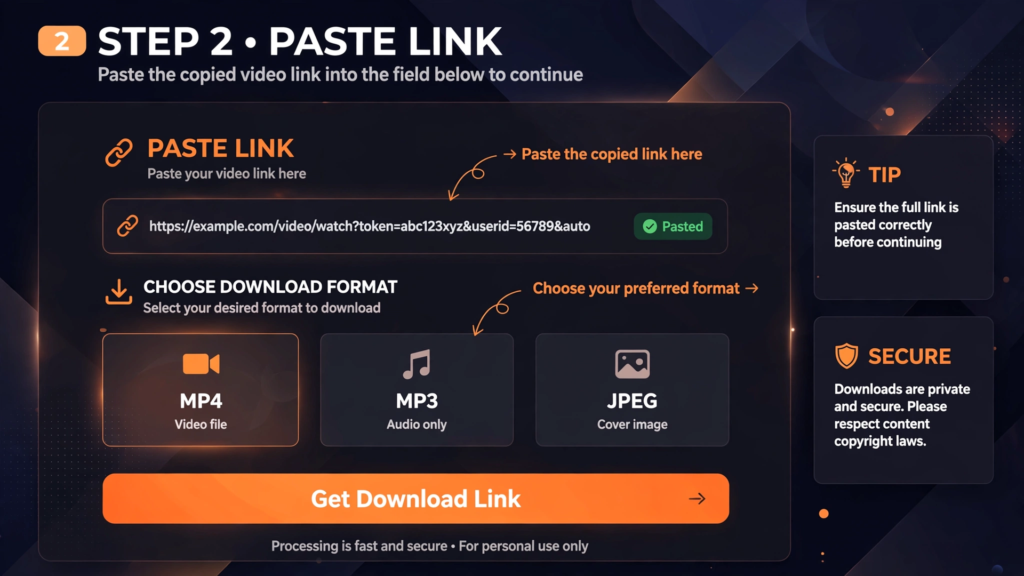
Step 2 — Paste It Here
Head back to our Kuaishou video downloader, paste the link you just copied, and hit the Download button. The tool detects your video automatically — you’ll see the quality options in seconds.
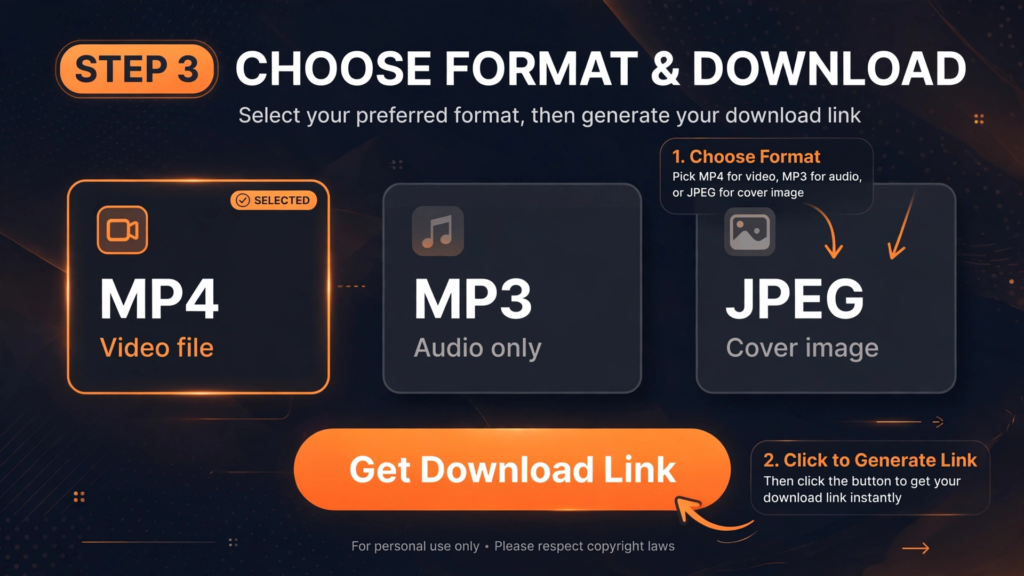
Step 3 — Pick Quality & Save
In 5 to 10 seconds, your video appears in preview. Pick your quality — 480p, 720p, 1080p, or 4K — then hit Download. Your watermark-free video saves straight to your PC, iPhone, or Android.
Save Time: Downloading more than one video? Don't repeat the same steps over and over — our bulk downloader saves entire lists at once. Batch-save multiple Kwai videos in minutes, not hours.
Bulk Download GuideTroubleshooting
Download Not Working?
Common Kuaishou Issues & Quick Fixes
Most problems take less than a minute to fix.
Below are the most common download issues — with a quick fix for each. But here’s the good news: if you followed the three steps above carefully, you’ll probably never need this section at all.
One Quick Fix That Solves Most Download Errors
Stable internet first — then download. If an error still pops up, these two fixes solve it:
Fix 1: Hard Refresh
Press Ctrl + F5 on your keyboard for a hard refresh. Then paste your video link again and hit "Get Download Link." This alone fixes the issue in most cases — instantly.
Fix 2: Retry the Request
Still seeing the error? Just click "Get Download Link" again and wait a few seconds. It's usually a temporary hiccup — server load, browser cache, or a shaky connection — and a simple retry clears it.
Still Stuck? Read the Full Troubleshooting Guide
Want the complete fix-it manual? Our all-in-one Kuaishou video troubleshooting guide covers every issue — including:
Every Kuaishou Link Format Supported
Our Kuaishou video downloader reads and parses every Kuaishou & Kwai link type — from mobile app shares to direct video URLs.
Share Links (Short URLs)
Shortened URLs from Kuaishou's built-in share button — the kind most people copy every day.
kuaishou.com/f/… k.kwai.com/… short.kwai.com/…International Kwai Links
Links from Kwai's international platform, shared by users outside China.
kwai.com/video/xxxxKwai App Share Links
Links copied straight from the Kwai mobile app on your phone.
v.kuaishou.com/…Short Links
Compact links with a shortened domain plus an ID — Kuaishou's quickest share format.
v.kuaishou.com o.e.kuaishou.comDirect Video Links
Full-length URLs pointing straight to a specific video on Kuaishou.
kuaishou.com/short-video/xxxxProfile & Photo Links
Links to creator profiles and photo posts on Kuaishou and Kwai.
The Basics
What Is a Kuaishou (Kwai)
Video Downloader?
A free online tool that saves any Kuaishou or Kwai video to your device — no watermark, no app needed.
Download Kwai videos with zero watermark — clean files, every single time.
Save straight to your device or gallery — no middleman, no waiting.
Video, MP3 audio, and images — one tool handles all three.
Works on any device — mobile, tablet, and desktop.
Kuaishou App vs. Our Downloader — Which Wins?
| Feature | Kwai App | Best Choice Our Downloader |
|---|---|---|
| Watermark | Yes | No Watermark |
| Offline Access | App only | Device storage |
| Login Required | Yes | No Login |
| Formats | Video Only | VideoMP3PNG |
Want to Learn More? Explore Our Guides
Our complete guide covers everything — including:
Want step-by-step Kwai instructions, troubleshooting tips, and every download method in one place? Read our complete Kwai video downloading guide — it has it all.
Comparison
Kuaishou vs TikTok vs Instagram Reels
Detailed Feature Comparison
Three short-video giants, compared side by side — see where each one wins.
| Feature | Kuaishou / Kwai | TikTok | Instagram Reels |
|---|---|---|---|
| Founded By | Cheng Yixiao & Su Hua | Zhang Yiming (ByteDance) | Kevin Systrom & Mike Krieger |
| Founded Date | March 2011 | September 20, 2016 | October 6, 2010 |
| Primary Markets | China, Brazil, SE Asia, Middle East | 150+ countries globally | Global, strong in West |
| Algorithm Focus | Community / loyal followers | Viral reach to new users | Explore page + algorithm |
| Algorithmic Sweet Spot | 10 – 20 seconds | 20 – 45 seconds | 45 – 60 seconds |
| Max In-App Recording | 57 seconds | 10 minutes | 3 minutes |
| Max Camera Roll Upload | 10 minutes | 60 minutes | 15 – 20 minutes |
| Download Option | Third-party tools supported | Third-party tools supported | Restricted, no easy download |
| Watermark on Download | Depends on tool | Depends on tool | N/A (not downloadable) |
Kuaishou (Kwai) plays a different game than TikTok and Instagram Reels. Instead of chasing viral algorithmic reach, it rewards community-driven content and loyal, repeat viewers — which is exactly why it dominates in Brazil, Southeast Asia, and the Middle East.
Key Features
Why Use Our Kuaishou Downloader?
Let's be honest — dozens of Kuaishou video savers exist. So why do people choose ours? Because we obsess over the details others ignore: speed, quality, privacy. Here's what keeps people coming back, again and again.
Download in any quality
Pick the size that fits your screen. Small phone? Grab a lighter file. Big screen? Go full 4K. You're always in control.
No logo or watermark
Every download comes out clean — no Kuaishou or Kwai logo stamped on top. Just the video, exactly as you want it.
Save audio as MP3
Only need the song or voice from a video? Pull just the audio in crisp 320kbps MP3 — perfect for music and spoken clips.
Paste any type of link
Link from the Kuaishou app, a browser, or a shared message — paste it as-is. No fixing, no reformatting. It just works.
Batch download — save many videos at once
Skip the one-by-one grind. Paste all your links at once, hit one button, and every video saves to your device together.
Your privacy is safe
We never save or store what you download. Your history lives only on your device — we can't see it, and your IP and activity are never recorded.
Saves to your gallery
Videos land straight in your camera roll or photo gallery. No strange formats, no extra steps — just press play.
Always kept up to date
Kuaishou changes its app often, which breaks most downloaders. We update ours fast, so it keeps working while you do nothing.
See your download history
Forgot what you grabbed? Your history panel shows every past download — stored only on your device, no account needed.
100% free, no limits
Download as many videos as you like. No daily cap, no sign-up, no paid plan — open, paste, download.
Kuaishou & Kwai Downloader Updates
Every fix, speed boost, and new feature — newest first.
Link Detection Patch
Fixed short-link parsing for v.kuaishou.com URLs — every share link now resolves correctly on the first try.
4K Fetch Speed +30%
Rebuilt our fetch pipeline from the ground up — 4K videos now start downloading up to 30% faster.
System Restored
All systems back online after scheduled maintenance — downloads are running at full speed again.
Timeout Reduction
Improved backend request handling to eliminate stalls — downloads stay smooth even on slow connections.
User Reviews Added
New reviews section is live — see what other downloaders say and share your own experience.
Is It Legal to Download Kuaishou or Kwai Videos?
Kuaishou and Kwai are two of the world's biggest short-video platforms. Millions of people watch, upload, and share videos there every day — and many want to save their favorites to watch offline later, or keep their own clips as memories. The question everyone asks: is downloading these videos legal? Let's break it down in plain words.
The Short Answer
It depends on what you do with the video after downloading it.
Personal viewing: downloading videos to watch yourself, offline, is generally fine.
Commercial use & reposting: re-uploading someone else's video or using it for business without the creator's permission — that's where it becomes a problem.
Rule 1: Your Own Videos? Zero Worries
Lost a video from your phone? If it’s still sitting on your Kuaishou profile, just download it again — it’s your content, so use it however you like. No restrictions, no worries.
Rule 2: Someone Else's Video? Personal Use Only
Want to download another creator’s videos? The same golden rule applies.
Watch it. Don't repost it. Don't sell it. Don't claim it as yours.
Watching a downloaded video later — offline, on your own phone, no internet — that’s personal use. Platforms and creators generally allow it, and nobody comes after you for it.
The problem starts when you take someone’s video and post it on YouTube, Instagram, WhatsApp status, or anywhere else for views or promotion — especially without credit. That’s copyright violation, plain and simple. Downloading a video doesn’t make it yours; it still belongs to the person who made it.
Rule 3: Never Use Downloaded Videos for Business
This is the biggest mistake people make. Using someone else’s video — in a paid ad, on a YouTube channel for views or income, or on a business page to promote a product — without permission is a direct copyright violation. Even crediting the creator’s name doesn’t make it okay.
What should you do instead? Message the creator and ask. Most say yes happily if you promise proper credit. And always get that permission in writing — even a screenshot of their “yes” is enough.
Platform Rules
What Do Kuaishou & Kwai's Official Rules Say?
Straight from the source — what the platforms officially allow, and where they draw the line.
Technically, Kwai and Kuaishou's Terms of Service say you shouldn't download content without permission. But that's a rule between you and the app — not the same as breaking the law. In practice, social media platforms almost never take action against someone who downloads a video just to watch it personally.
Safe Content Only
No adult content, violence, hate speech, or dangerous stunts — the platform keeps the feed clean for everyone.
No Fake News
Fake news and false health claims get stopped before they can spread across the platform.
Music Rules
Use music in your videos, and Kuaishou makes sure the original artists get paid fairly.
Honest Selling
Selling on a live stream? No lying about products, no overselling what they can do.
Earning Rules
Gifts, commissions, and creator payouts all follow clear regional guidelines.
Age Limits
Kids below the minimum age can't make in-app purchases or send gifts without supervision.
Here's the key point — these rules are for creators and sellers, not everyday viewers. If you're just downloading a video to watch it offline, none of them apply to you.
Same Download, Different Country — Different Law?
Yes — the law changes from country to country, because every nation writes its own rules, shaped by its government, culture, and legal traditions. Here’s why:
- Every country makes its own laws. No outside nation or body can force it to follow someone else’s rules.
- Culture and religion matter. Local traditions shape what people see as right or wrong — and that affects how strictly copyright gets enforced.
- Legal systems differ. The US and UK lean on past court decisions; much of Europe follows written law codes; many South Asian and Middle Eastern countries blend local and religious law.
That’s why downloading the same video for personal use can be treated differently depending on where you are. Here’s how it plays out in a few key countries:
Pakistan
Personal use allowedUnder the Copyright Ordinance 1962, downloading for personal use is generally allowed — but reposting or using content commercially without permission is a serious violation.
India
Technically illegalUnder the Copyright Act 1957, downloading copyrighted video without permission is technically illegal, even for personal use. In practice, enforcement targets large-scale distribution and commercial misuse — not individual personal downloads.
United States
Strict — DMCAThe US has some of the world's strictest copyright laws, backed by the DMCA. Downloading copyrighted content without permission is illegal regardless of intent — the only exceptions are content you own or that's licensed under Creative Commons.
The bottom line: personal, private downloading is rarely acted upon anywhere. But legal exposure becomes real the moment content is reposted or used commercially — and it's highest in strict-enforcement countries like the US.
Quick Summary
| What You Do | Is It Okay? |
|---|---|
| Download your own video | Yes |
| Download someone else's video to watch privately | Yes |
| Repost someone else's video without permission | No |
| Use someone else's video for ads or business | No |
| Get a "yes" before you repost | Yes |
Trust & Safety
Your Privacy & Security
We take your privacy seriously — here's exactly how we protect you.
No video storage — downloads travel straight from Kuaishou to your device, never touching our servers.
No tracking — your activity is yours alone; we never watch what you do.
No login required — you're completely anonymous here.
HTTPS protection — every connection is encrypted and secure.
No data collection — no emails, no IPs, no personal info. Ever.
Worldwide
Kwai Video Downloader for Global Users
No matter where you are — download Kwai videos in your language, on any device.
Search in your language — our tool understands them all.
Kwai is now one of the most-used short video platforms outside China. It’s a leading TikTok alternative in Brazil, and hugely popular across Indonesia, Saudi Arabia, the Middle East, Vietnam, and Malaysia. Whether you’re downloading Kwai videos in São Paulo, Jakarta, Riyadh, or Mumbai — our tool works exactly the same everywhere: fast, free, and watermark-free.
Search in Your Language — Our Tool Understands Them All
No matter how you search, in whatever language — it just works.
English UsersEnglish
"download kwai video without watermark"
Get clean Kwai videos with no logo, in HD and 4K.
Portuguese UsersUsuários do Kwai
"baixar vídeo kwai sem marca d'água"
Baixe vídeos do Kwai sem marca d'água, grátis.
Indonesian UsersPengguna Indonesia
"download video kwai tanpa watermark"
Dapatkan video Kwai tanpa logo, cepat dan gratis.
Arabic Usersمستخدمي كواي العرب
"تحميل فيديو كواي بدون علامة مائية"
حمّل مقاطع كواي بدون علامة مائية، مجاناً.
Urdu Usersاردو صارفین
"کوائی ویڈیو ڈاؤن لوڈ بدون واٹر مارک"
بغیر واٹر مارک کوائی ویڈیو ڈاؤن لوڈ کریں۔
Hindi Usersभारतीय उपयोगकर्ता
"bina watermark kwai video download kaise kare"
बिना वॉटरमार्क Kwai वीडियो डाउनलोड करें।
Spanish UsersUsuarios hispanohablantes
"descargar videos de kwai sin marca de agua"
Descarga videos de Kwai sin marca de agua.
Turkish UsersTürk Kullanıcılar
"filigransız kwai video indir"
Filigran olmadan Kwai videoları indirin.
Vietnamese UsersNgười dùng Việt Nam
"tải video kwai không logo"
Tải video Kwai không dính logo, miễn phí.
French UsersUtilisateurs français
"télécharger vidéo kwai sans filigrane"
Téléchargez des vidéos Kwai sans filigrane.
Korean Users한국 사용자
"워터마크 없는 쾌이 영상 다운로드"
워터마크 없이 쾌이 영상을 다운로드하세요.
Chinese Users中国用户
"快手视频去水印下载"
无水印下载快手视频,免费高速。
(Detailed instructions, troubleshooting, and tips for users worldwide)
Frequently Asked Questions
Yes — 100% free, no catch. No hidden fees, no "premium" unlock, no subscriptions. Download as many videos as you want, for as long as you want.
No. Everything runs right in your browser — paste the link, hit download, done. Nothing to install, nothing to update, zero storage wasted on your phone.
No — and that's by design. If a video is private or needs a password, we can't reach it. We only download videos that are publicly visible to everyone.
On Android and Windows, files land in your Downloads folder — check your file manager or gallery. On iPhone/iPad, look in your browser's downloads section; you may need to move the file to Photos manually.
Absolutely. It works on Android and iPhone in any modern mobile browser. No app needed — the whole tool is built mobile-first.
Whatever the creator uploaded — from 480p all the way to Full HD 1080p and 4K Ultra HD. The tool shows every available quality, so you pick what fits your screen.
Never. We don't save your videos, we don't track your downloads, and we don't collect emails, IPs, or personal info. You're completely anonymous here.
As many as you want. No daily limit, no quota, no throttling — download 1 or 1,000, it's all the same to us.
Three usual suspects: the link was copied wrong, an ad blocker is interfering, or your connection dropped. Re-copy the link, pause your ad blocker for our site, and try again — that fixes it almost every time.
You can download them, yes — but respect the creator. Give credit when you share, and never repost someone's video for profit without their permission.
Conclusion
Download Kuaishou Videos Online — Easily & Safely
Everything you need to know, wrapped up — plus one final reason to try it now.
Forget risky software that can harm your data. Our Kuaishou video downloader gives you ultra-high-quality 4K downloads with no logos — free, right in your browser.
It’s the latest version of the Kuaishou (Kwai) video downloader, kept current with continuous updates and maintenance. That means reliable performance on any device — Android, iPhone, PC, or Mac — with your security always protected.
Got questions? Check our detailed FAQ section or contact us — we’re always here to help.