
How to Download Kuaishou Videos Without Watermark (2026)
Save any Kuaishou video in HD on your PC or Mac — no watermark, no app, no sign-up. Just paste the link and download in seconds.
📌 Last Updated: November 2026
Kuaishou — also known as Kwai — has quietly become one of the world’s biggest short-video platforms, with over 700 million monthly active users scrolling, sharing, and creating every single day. But here’s the frustrating part: the app gives you no simple way to save those videos to your computer.
In this free 2026 guide, I’ll walk you through exactly how to download Kuaishou videos on your PC or Mac — no watermark, full HD and even 4K quality, no software to install, and no login required. All you need is the video link and a few seconds. Let’s dive in.
Key Points
Everything you need to know before you download — in 30 seconds.
100% Free, No App Needed
Download Kuaishou videos directly in your browser. No software to install, no extensions, no hidden fees — free means free.
No Watermark, Ever
Get clean, original MP4 files with the watermark fully removed. What you save looks exactly like the original — minus the logo.
True 4K & Full HD
Keep every pixel. Save videos in their original quality — from sharp HD and 1080p right up to 4K Ultra HD.
Private & Secure
No sign-up, no login, no personal details. Your downloads stay on your device — and your activity stays yours.
A quick note: please download videos for personal use only and respect each creator's rights.
What You Need Before Downloading Kuaishou Videos on PC
You’re 30 seconds away from your first download. Here’s everything you need to download Kuaishou videos on your PC or Mac:
✅ Any PC or Mac with a modern browser (Chrome, Firefox, Safari, or Edge)
✅ The Kuaishou video link you want to save — just copy it from the app or website
✅ A stable internet connection for fast, uninterrupted downloads
✅ A little free storage space — HD and 4K videos need room to breathe
That’s genuinely it. No apps to install, no sign-up, no catch.
Why Download Kuaishou Videos on Your PC?
It's not just about saving videos — here's what downloading to a PC unlocks.
Watch Offline, Anywhere
Save videos to your computer and watch them on a flight, in the subway, or anywhere without Wi-Fi — without burning mobile data.
Build Your Own Library
Collect tutorials, recipes, and educational clips in one place on your PC. Your personal reference shelf — always ready, always organized.
Save Before It's Gone
Creators delete old videos all the time. If you love a clip, download it now — tomorrow it might vanish forever.
Edit Like a Pro
Drop downloaded clips straight into your editing software. Bigger screen, proper tools, full control — no compromises.
Share With Anyone
Send videos to friends and family who don't even have the Kuaishou app — as a simple file, no links or logins needed.
Backup What Matters
Keep a safe copy of your favorite moments on your own hard drive. Platforms change — your files don't have to.
Why Download Kuaishou Videos on PC & Mac? 7 Benefits (2026)
Your phone is great for scrolling — but when it’s time to actually work with videos, the desktop wins every time. Whether you’re a content creator, a video editor, or just someone who loves high-quality content, you already know the truth: real work happens on a PC. Bigger screen, proper software, full control. Downloading Kuaishou videos to your computer unlocks things your phone simply can’t:

Batch Download Kuaishou Videos: Save Hours in One Click
Tired of downloading videos one by one? If you’re a content creator — or just someone who loves saving clips — doing it one at a time gets exhausting fast. That’s exactly what our high-performance batch downloader is built for: turning that boring, repetitive chore into a one-click job. Paste all your Kuaishou video links at once, hand them to the tool, and walk away. A few minutes later, every video is sitting ready on your PC.
How to Batch Download Like a Pro:
- Grab your links — Copy the URLs of all the Kuaishou videos you want to save.
- Drop them in — Paste the whole list into the batch box on the downloader tool.
- Hit download — Press the button and let the tool fetch every video. Within seconds, your files start saving to your PC automatically.
The Creator Workflow: From Kuaishou Link to Finished Video
Edit in CapCut Desktop, Adobe Premiere Pro, or DaVinci Resolve? Then you’ll love this: once your Kuaishou videos are downloaded to your PC, there’s no more messing with cables, USB transfers, or phone-to-computer workarounds. Just import the files straight from your computer into your editor and stay in the flow — no interruptions, no wasted time.
Download Kuaishou Videos While You Work — Zero Waiting
Here’s where it gets good: keep the downloader open in one browser tab and your editing software in another. The moment a Kuaishou video finishes downloading, drag it straight into your project timeline — no waiting, no switching devices, no breaking your rhythm. Your workflow stays fast, smooth, and completely uninterrupted.
Download Kuaishou Videos in Lossless Quality
Your phone quietly squashes every video to save storage — so what you see is never the full quality. Download that same Kuaishou video on your PC and you get the highest-quality version with zero compression and zero loss. That difference matters: if you’re editing the clips later, compressed footage falls apart the moment you crop, zoom, or color-grade it. And even if you’re just watching, HD simply looks better on a bigger screen.
Post-Process Kuaishou Videos Like a Pro
Start with a clean Kuaishou download and everything you add later — filters, effects, transitions, text — actually looks good. There’s no watermark baked into the pixels, so you won’t get those weird blurry patches or glitchy artifacts that show up when you edit over one. Just a solid, clean video file that’s ready for you to work your magic on.
Save Phone Storage: Download Kuaishou Videos to PC
Sure, you can save videos on your iPhone — but 4K files eat storage for breakfast and drain your battery while they’re at it. Download to your PC or Mac instead, and move everything to an external hard drive or SSD in seconds. Your whole video collection stays organized, searchable, and safe — without turning your phone into a cluttered mess.
5 Reasons Our PC Downloader Beats the Kuaishou App
Still deciding? Here’s the honest breakdown of why a PC is the smartest choice for downloading Kuaishou videos — and every feature you unlock when you switch:
Kuaishou Mobile App vs Our PC Downloader
See exactly what changes when you switch to PC downloading.
| Feature | Kuaishou Mobile App | Recommended Our PC Downloader |
|---|---|---|
| Video Quality | Usually 720p–1080p max | ✓ Full 4K, original quality |
| Watermark | ✗ Always there, can't remove it | ✓ Completely gone, clean videos |
| Audio Quality | Compressed, lower quality | ✓ Original, crisp sound |
| Storage Space | Fills up your phone fast | Save to hard drive — unlimited room |
| File Size | Smaller, but lower quality | Full quality, zero compression |
| Batch Download | One video at a time | ✓ Entire lists in one click |
| Privacy | App tracks your activity | ✓ Private download, no tracking |
The bottom line? If you want the best-quality Kuaishou videos — no watermarks, no compression — without killing your phone’s storage, downloading on a PC is the way to go. Better quality, bigger screen, total privacy. Once you try it, you won’t go back.
How to Download Kuaishou Videos Without Watermark on PC & Mac
Below is the complete walkthrough: how to download your favorite Kuaishou videos without a watermark, in full HD quality, on both PC and Mac. Just follow the steps — you’ll be done in under a minute.

Step 1: Copy the Kuaishou Video Link
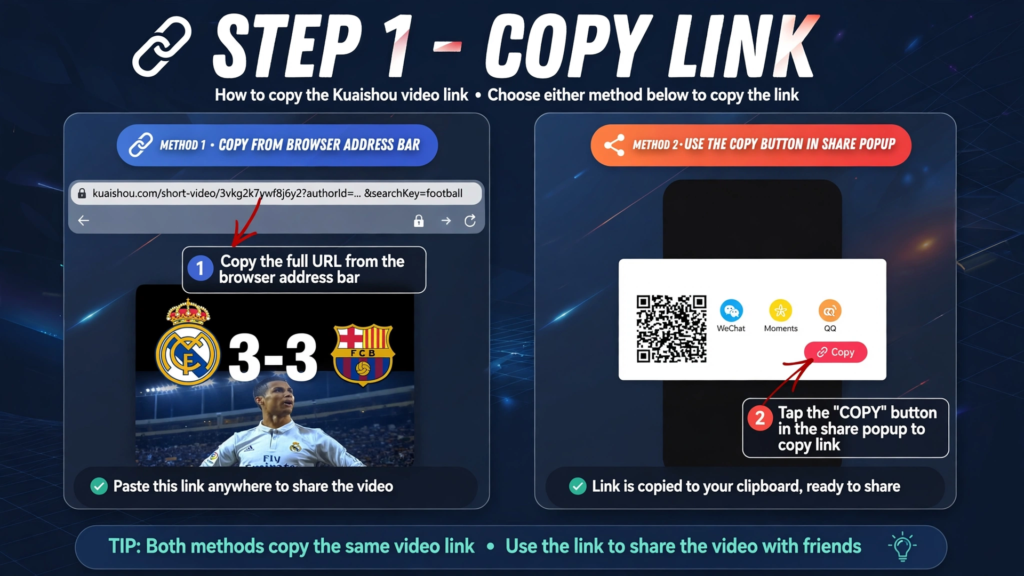
Open Chrome, Firefox, or Safari — whatever browser you normally use — and find the Kuaishou video you want to save. Now copy its link using whichever method feels easier:
Option 1 — From the address bar: Click the address bar at the top of your browser. The full URL gets highlighted — right-click and hit Copy, or just press Ctrl+C (Windows) / Cmd+C (Mac).
Option 2 — From the Share button: Tap the Share icon on the video and look for “Copy Link.” One tap, and the link is sitting on your clipboard.
Step 2: Paste Your Link Into the Kuaishou Downloader
Now open a new browser tab and head to the free Kuaishou video downloader — you’ll spot the input box right away.
Paste your link: Right-click inside the box and hit Paste, or just press Ctrl+V (Windows) / Cmd+V (Mac). Your copied link drops right in.
Hit the button: Click “Get Download Link” and let the tool fetch your video. That’s it — your download options appear in seconds.
Step 3: Save Your Kuaishou Video in HD, No Watermark
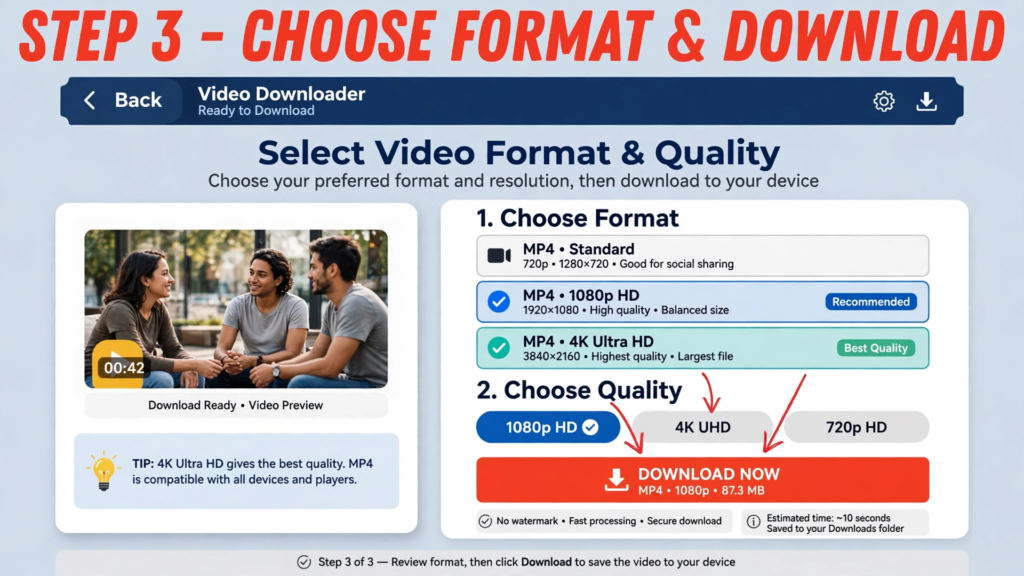
Click the Download button and the tool strips the watermark, handing you a clean, high-quality MP4 file. Hit “Save” — and boom, it’s on your computer, sitting in your Downloads folder. No watermark, no hassle — just a crisp video, ready to watch, share, or edit.
Which Video Quality Should You Choose?
Not sure? Here's a quick breakdown to help you decide.
Smaller file, saves storage space
Good quality, reasonable file size
Best balance — most popular choice
Maximum detail, ideal for editing or big screens
Kuaishou Download Not Working? Fix It in Minutes (2026)
Even the fastest computer hits a snag sometimes. Downloading Kuaishou videos is usually smooth — but if something goes wrong, it’s almost always one of these usual suspects:
Browser Blocking the Download? Here's the Fix
Sometimes your browser gets a little overprotective and blocks the download. Don’t worry — you haven’t done anything wrong.
Look for a small warning near the address bar (top) or at the bottom of your screen. Just click “Allow” or “Keep,” and your download starts automatically. Our site is 100% safe — your browser is simply being extra cautious.
Downloader Stuck on Processing? Here's How to Fix It
This usually happens for two boring reasons: slow internet, or your browser holding onto old junk data. Here’s the fix, in order:
- Refresh the page — Press F5 (Windows) or Cmd+R (Mac), then paste your link again. This alone solves it most of the time.
- Clear cache and cookies — If refreshing didn’t help, open your browser settings, clear browsing data (cache + cookies), and try again with a fresh slate.
- Check your internet — Make sure you’re actually connected. Open any other website — if it doesn’t load either, your Wi-Fi is the culprit, not the downloader.
Antivirus False Positive? Your Download Is Safe
Very rarely, your antivirus might flag a downloaded video as suspicious. Don’t panic — it’s just being overprotective about a perfectly normal MP4 file. If it blocks your download, pause the antivirus for a minute, finish downloading, then turn it straight back on. Problem solved.
Where Did My Kuaishou Video Download Go?
- Windows: Open File Explorer and click “Downloads” in the left sidebar — your video should be sitting right there.
- Mac: Open Finder and look for the “Downloads” folder. You’ll usually spot it in the sidebar, or in the dock right next to the Trash.
Why Your Kuaishou Link Shows 'Not Found' (And the Fix)
You pasted the link, but the tool says “video not found.” Frustrating — but there’s usually a simple reason:
The video is private: If the creator set it to private or friends-only, no downloader can access it. Only public videos work — that’s a platform rule, not a tool problem.
Regional restrictions: Some videos are blocked in certain countries. If you’re outside the region where it was posted, the video simply won’t load for download.
Kuaishou Video No Sound After Download — Fixed
Downloaded a video that plays perfectly but has no sound? Relax — nothing went wrong. Some videos are simply posted without any audio on Kuaishou in the first place. If the original has no sound, your download won’t either. The file is 100% fine — it’s just a silent video.
Kuaishou Download Issues? Quick Troubleshooting Guide (2026)
Bookmark this page: every common Kuaishou download issue you’ll ever run into — each paired with its quick fix, all in one place.
Troubleshooting Quick-Reference
Every common issue — with its fast fix, all in one place.
| Problem | Likely Reason | Fast Fix |
|---|---|---|
| Silent Video | Codec mismatch — or the original video simply has no audio. | Play it in VLC Media Player, or check whether the original video on Kuaishou has sound. |
| Blocked Download | Your browser's security settings stepped in. | Click "Keep" or "Allow" in your browser's download notification. |
| Infinite Loading | Your browser cache is holding onto old data. | Hard refresh: Ctrl + F5 (Windows) or Cmd + Shift + R (Mac). |
| Invalid URL | The video is region-locked or has been deleted. | Check if the video still plays on Kuaishou — try a VPN if it's region-locked. |
| Download Won't Start | A pop-up blocker is active. | Click the "blocked" icon in your URL bar and select "Always allow pop-ups." |
| File Corrupted | The download didn't finish completely. | Delete the partial file and re-download with a stable connection. |
| Antivirus Warning | False positive on the MP4 file. | Our files are 100% clean. Temporarily pause your "Web Shield" or whitelist our site. |
| Slow Download Speed | Busy server, or your local Wi-Fi is lagging. | Check your connection, wait a minute, then click the button again. |
What to Do After Downloading: 7 Pro PC Tips (2026)
What to Do After Downloading
Your video is on your PC — here are 6 smart ways to use it.
Watch in Stunning Quality
Skip the basic Windows Media Player — grab the free VLC Media Player instead. It plays every video perfectly, with smooth playback, speed controls, and crisp high-quality output.
Edit and Create Content
Your download is watermark-free, so drop it straight into Adobe Premiere Pro, DaVinci Resolve, or CapCut — perfect for YouTube videos, reactions, compilations, remixes, and Reels.
Upscale to 4K with AI
Turn a 1080p clip into stunning 4K with AI tools like Topaz Video AI — they can also color-grade, stabilize shaky footage, and polish the overall look like a pro.
Add Subtitles and Captions
Subtitles make any video look more professional — and reach a bigger audience. Use CapCut, Premiere Pro, or a free online subtitle generator to add them in minutes.
Convert to Any Format
Need a different file type? Use HandBrake or a free online converter to switch your MP4 to MOV, AVI, or WebM — whatever your platform or device needs.
Save and Back Up Your Files
Move downloaded videos to an external hard drive, SSD, or cloud storage like Google Drive or Dropbox. Stay organized and backed up — never lose a clip.
Is It Legal to Download Kuaishou Videos?
Let's answer the question everyone asks: is it actually legal? The short answer — downloading Kuaishou videos for personal, offline viewing is generally fine. But "personal" is the key word. Keep these simple boundaries in mind:
Golden rule: when in doubt, respect the original creator. It's always the safest approach — and the right one.
Kuaishou Video Downloader for PC & Mac: Frequently Asked Questions
Quick answers to the questions we hear most.
Not exactly — there's no official ".exe" or ".dmg" Kuaishou app as of 2026. But you don't need one: the Kuaishou web version works fully in your browser, and that's all our downloader needs.
Copy the video link, paste it into the downloader above, and hit Download. The tool strips the watermark automatically — you'll get a clean MP4 in seconds.
Yes. Open the Kuaishou web version in your browser, sign in, and use the upload button — no phone needed.
It shouldn't be. If your file looks soft, you probably grabbed a lower-quality option. Always pick 1080p or 4K before downloading to get the full original quality.
Ours is — no sign-up, no software, no personal data. As a rule, avoid any downloader that asks you to install programs or hand over login details.
Right-click anywhere on the page in Chrome and select "Translate to English." It takes two seconds and makes everything readable.
Kling AI — Kuaishou's AI video tool — has its own web portal that works fine on PC. It's separate from the main Kuaishou site, so just open it directly in your browser.
Exactly the same way: copy the link, paste it into our downloader in Edge or Chrome, and save the MP4. Windows 11 needs nothing special.
Absolutely. The downloader runs in your browser, so it works on Mac, Windows, and even Linux — Safari, Chrome, or Firefox, your choice.
Yes. Nothing gets installed, and the MP4 files are clean. If your antivirus ever flags one, it's a false positive — pause it for a minute and you're done.
The Kuaishou app itself doesn't offer direct downloads with quality options — that's why this tool exists. Paste the link here and download directly to your PC or Mac.
No. Everything happens in your browser. No apps, no extensions, no setup — just the link.
In your browser's default Downloads folder — on Windows that's File Explorer > Downloads, on Mac it's Finder > Downloads.
Browsers sometimes block unfamiliar downloads out of caution. Click "Keep" or "Allow" in the download bar and it'll start right away. Our site is fully safe.
Yes — use the batch downloader. Paste multiple links at once and download them all together instead of one by one.
No. Every video downloads watermark-free, in its original quality.
No questions match your search. Try different keywords.
Kuaishou Downloader vs Other Tools: Honest 2026 Comparison
Our Downloader vs Other Tools
Plenty of tools promise Kuaishou downloads — here's how they actually stack up.
| Tool | Recommended Our Downloader |
SnapSave | 4K Video Downloader App |
Kuaishou App (Official) |
|---|---|---|---|---|
| Watermark Removal | Yes | Sometimes | No | Always watermark |
| 4K Quality | Yes | No | Yes | Limited |
| No Install Needed | Yes | Yes | Needs install | App required |
| Free | Yes | Yes | Paid | Yes |
5 Most Reliable Kuaishou Downloaders for PC & Mac (2026)
Our free online downloader is built for desktop users who want a fast, easy, and secure way to download Kuaishou videos without a watermark. Nothing to install — just open the tool in your browser and save any video in seconds.
Your PC or Mac is the perfect place to build a video library — unlimited storage, professional editing software, and true 4K quality. But random downloader apps can slow your system down, or worse, hide malware that steals your data. Our tool runs 100% online, so you get all the desktop power with none of the risk. Your data stays private and secure — always.
Follow the steps in this guide, use the tips we’ve shared, and you’ll have a clean, organized collection of high-quality Kuaishou videos — ready to watch, edit, or share anytime. No watermarks, no hassle. Just your favorite content, saved exactly how you want it.
Ready? Paste your video link into the Online video downloader above and grab your first video in seconds. It’s that easy.
Kuaishou Video Downloader Team
Editors & Developers • kuaishouvideodownloader.org
Hands-On Tested
Every method checked on real devices before we publish.
Kept Current
Reviewed and updated whenever Kuaishou changes its platform.
Beginner-Friendly
Clear steps — zero technical jargon required.
Works Everywhere
iPhone, Android, PC and Mac — all covered.